Loudness delivery is one of those problems that should have been solved at a reasonable price-point by now. Every major platform publishes its normalization target. BS.1770 has been the broadcast standard for over a decade. And yet the workflow for getting a master to a specific integrated LUFS is still – in most setups – play the track, check the meter, calculate the offset, adjust the gain, play the track again, check the meter again. Volume Dealer is an solution to eliminate that loop.
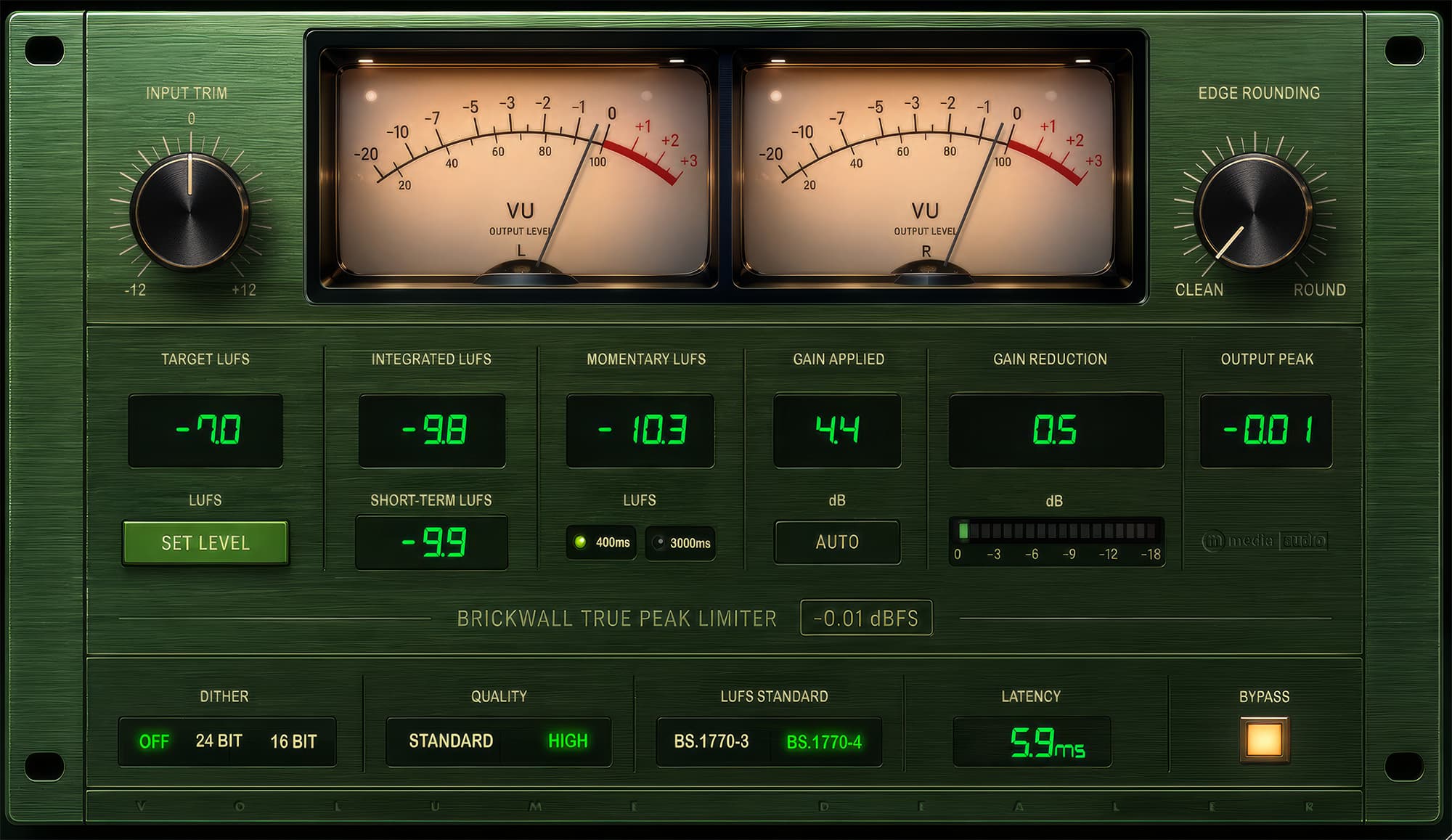
Load it last on your master buss. Set your Target LUFS. Play the track. When the integrated measurement stabilizes, click Set Level. The plugin calculates the difference and applies the exact corrective gain in one step. That is the workflow. The arithmetic happens in the plugin, not in your head.
It is free. We made it free because it is the kind of tool that should just exist and not cost anything.
The Loudness Problem
The fragmentation of loudness targets is real and ongoing. Spotify targets around -14 LUFS integrated. Apple Music is similar. YouTube is louder. Podcast platforms have their own specs, many of them stating -16 LUFS. Broadcast has its own standards depending on region and medium – they really have to be adhered to, but for everything else, people hand in -7 to -10 LUFS and call it a day. A master that is correct for streaming is usually not ideal for CD, and neither of those is right for a podcast delivery.
Volume Dealer handles this by letting you dial in the target yourself and measuring against it. BS.1770-3 and BS.1770-4 are both selectable – BS.1770-4 adds a gating stage that excludes near-silence passages from the integrated average, which is the correct measurement for most delivery specs. The metering suite shows Integrated, Momentary (400 ms or 3 second window, selectable), and Short-Term (3-second average) simultaneously. You see all three in real time while the track plays.
The Limiter
The true-peak limiter is a brickwall lookahead design with a hard ceiling at -0.01 dBFS. The Edge Rounding control adjusts the soft knee character from 0 to 100% – fully hard at 0%, a 6 dB pre-transition zone at 100% for smoother handling of dense material. Input Trim covers -12 to +12 dB before the metering and limiting stages.
High Quality mode runs the limiter at 2x the session sample rate using an IIR half-band polyphase filter. At native sample rate, inter-sample peaks can exceed 0 dBFS after DAC reconstruction – the digital ceiling does not catch them because they do not exist until the analog side reconstructs the waveform. Running the limiter at 2x makes those peaks visible and catches them before they cause problems on playback hardware. Latency from oversampling is reported to the host so DAW PDC handles the compensation automatically. For tracking and monitoring, Standard mode keeps latency low. For final export, High Quality is the correct choice.
Dithering covers three settings: off, 24-bit noise-shaped, and 16-bit noise-shaped for CD or 16-bit export. If you are exporting below your session bit depth, engage dithering. If you are staying at 24-bit or 32-bit, leave it off.
Getting It Onto Three Platforms
Volume Dealer ships for Windows, macOS, and Linux. The Windows and macOS builds were straightforward relative to what came before them – by the time we were building Volume Dealer, the CI pipeline was already proven across three platforms from previous releases. What we had learned the hard way on Violet Crown and the paid plugins carried directly forward.
Linux support for a metering and limiting tool matters more than it might seem. Engineers running headless Linux systems, Reaper on Ubuntu, Bitwig on Arch – these are not edge cases to dismiss. The Linux audio community is small but serious, and the barrier to entry for running professional-grade tools on Linux has historically been high. We wanted Volume Dealer to work there without asterisks.
The macOS notarization pipeline that caused the most pain on earlier releases was already running cleanly by this point. Volume Dealer went through the signing and notarization workflow without incident – signed Developer ID binary, notarized bundle, stapled ticket, Gatekeeper-clean on every macOS version we tested. The Universal Binary covers both Intel and Apple Silicon natively. No Rosetta fallback, no compatibility mode.
Getting audio plugins consistently out the door on all three platforms as a small shop means accepting that the build infrastructure is a product in itself. The CI pipeline, the signing workflow, the artifact packaging – none of that is glamorous work, and none of it is visible to the person who downloads the zip and drops it in their DAW folder. But it is the difference between a plugin that installs cleanly and one that triggers a security warning or silently fails to load on Linux.
The Workflow
- Insert Volume Dealer last on the master bus
- Set Target LUFS to your delivery spec
- Play the track and let Integrated stabilize
- Click Set Level
- Play through to confirm
- Switch to High Quality mode for final export if inter-sample peaks are a concern
- Enable Dither if exporting below session bit depth
- Export
The Gain Applied readout shows exactly what was applied. Reset Measurement clears the accumulator when you need to re-measure after any change.
Free. No account. No activation. No expiry. Windows, macOS, and Linux in one download.