M Media Audio Releases Magic Buss – Three-Stage Serial Bus Compressor with Per-Stage Parallel Blend for Windows, macOS, and Linux
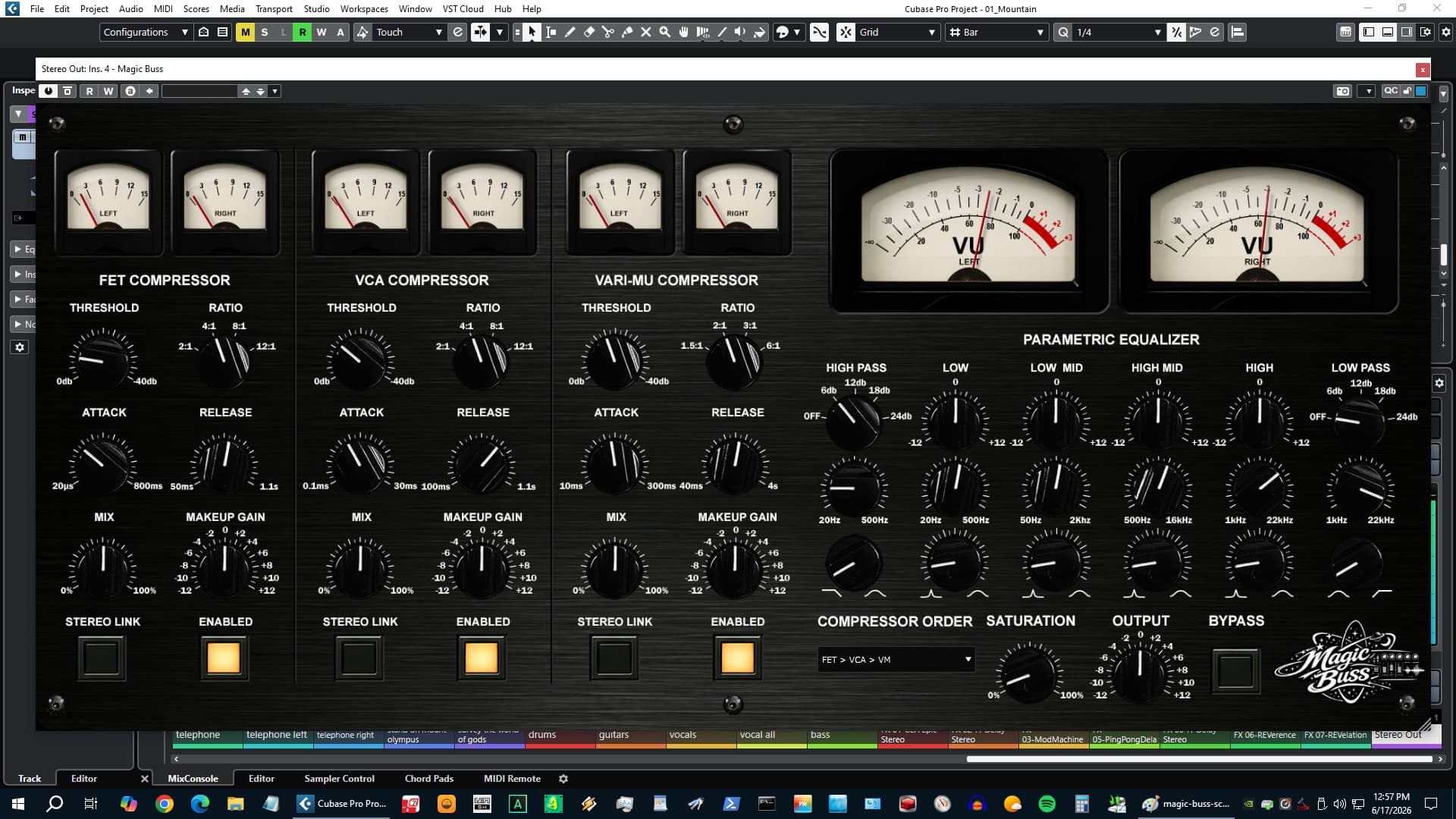
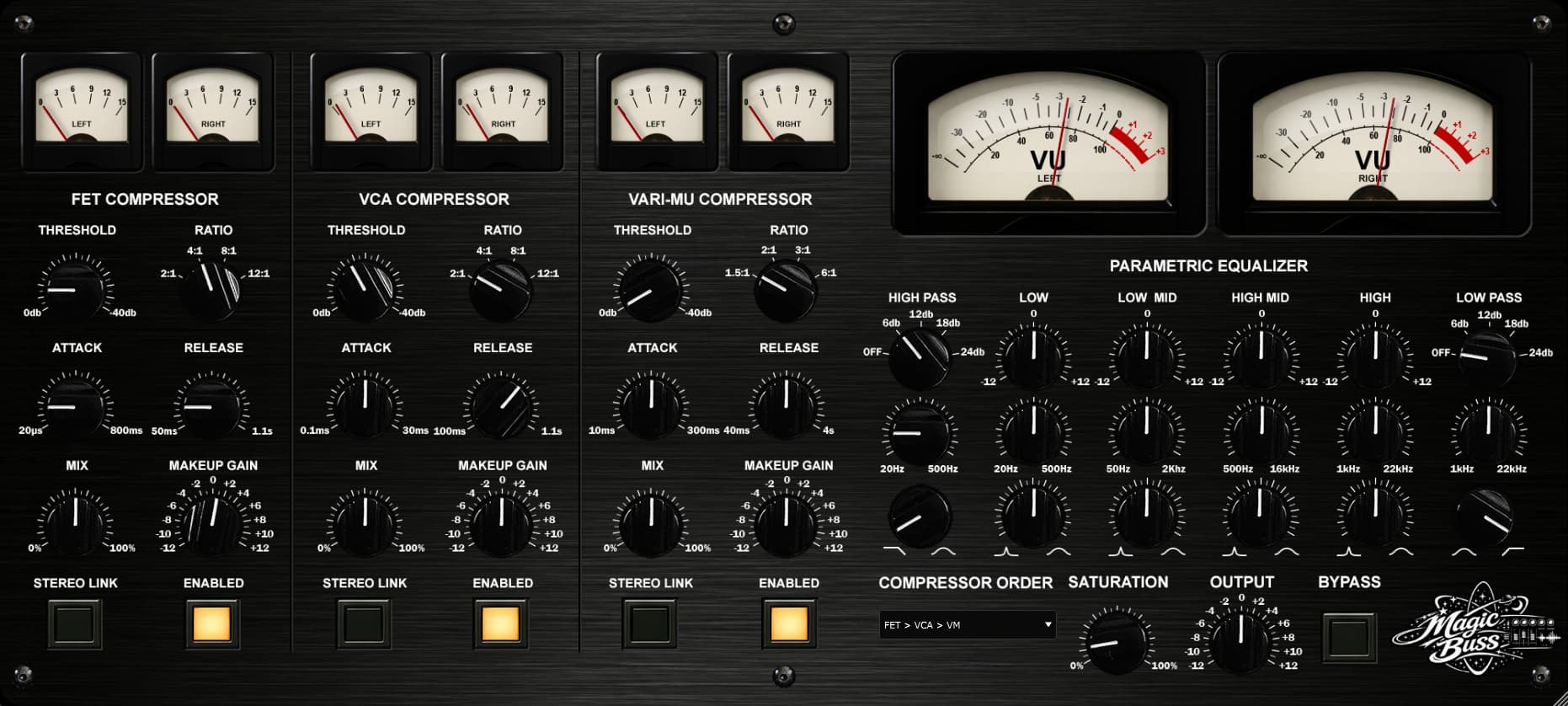
M Media Audio has released Magic Buss, a three-stage serial bus compressor running FET, VCA, and Vari-Mu compression in series – each with its own parallel blend knob, independent stereo link toggle, and dedicated L/R gain reduction meters. A six-band parametric EQ follows the compressor chain, and a tanh saturation stage adds tape and transformer density before the output trim. The processing order of all three stages is switchable via a dropdown with all six permutations.
The default stereo link behavior is unlinked on every stage – left and right channels run fully independent detectors and gain computers. When the mix is stereo-uneven, each channel compresses on its own content. The GR meters show different readings on L and R when unlinked, because they are doing different work. Engineers accustomed to linked bus compressors pushing the stereo image toward center under heavy gain reduction will hear the difference immediately.
M Media Audio has been in professional audio since 1994. Based in Austin, Texas, the studio has mixed, mastered, and broadcast thousands of records and live performances over three decades. Magic Buss came out of a real mastering chain – the need for a serial compression workflow where each stage could be dialed in independently, ordered deliberately, and blended in parallel without committing to a heavy-handed result.
Each compressor stage – FET, VCA, and Vari-Mu – operates as a fully independent processor with its own Threshold, Attack, Release, Ratio selector, Makeup Gain, Mix knob, Link toggle, and In/Out switch. The FET uses peak detection with a hard knee and attack times down to 20 microseconds. The VCA uses RMS detection with a soft knee and an optional program-dependent Auto release mode. The Vari-Mu uses inherently program-dependent time constants, a very soft knee, gentler ratio options (1.5:1 to 6:1), and adds subtle even-harmonic content as a characteristic of its gain element – warmth that the FET and VCA stages don’t produce.
Features
- Three compressor stages in series: FET (peak, hard knee), VCA (RMS, soft knee, Auto release), Vari-Mu (program-dependent, very soft knee, even-harmonic character).
- Per-stage parallel blend (Mix knob, 0-100%) – independent NY-style parallel compression at each stage.
- Order switch – all six FET/VCA/Vari-Mu permutations selectable.
- Per-stage stereo Link toggle – unlinked by default, linked available on each stage independently.
- Six GR meters – L and R per stage, show independent readings when unlinked.
- Six-band parametric EQ after the compressor chain: HP (Off/6/12/18/24 dB/oct), Low shelf or bell, Lo-Mid bell, Hi-Mid bell, High shelf or bell, LP (Off/6/12/18/24 dB/oct).
- Saturation stage – tanh waveshaper, single Drive knob, calibrated for tape and console transformer character at moderate settings.
- Output Gain trim, -12 to +12 dB.
- Global Bypass.
- Dual VU meters – output L and R, 300ms ballistic RMS.
Availability and Pricing
Magic Buss is priced at $39 with a perpetual license – one purchase, no subscription, no renewal, no cloud dependency. Three simultaneous activations included. A fully functional demo is available with no account required – a brief silence plays every 30 seconds in demo mode. Download and demo at mmediaaudio.com.
System Requirements
- Windows 10/11 – VST3 64-bit.
- macOS 11 Big Sur or later – VST3 + AU 64-bit, Universal Binary (Apple Silicon + Intel). Signed and notarized.
- Linux – VST3 64-bit.
How to Use Magic Buss – Serial Bus Compression, Per-Stage Blending, and Getting the Most from Three Different Compressor Characters
Bus compression is one of those things that either sounds like glue or sounds like a mistake. The difference is usually not how much compression you’re applying – it’s which character you’re applying, in what order, and how much of it is actually audible in the blend. Magic Buss is built around those three decisions. Here’s how to work it.
Start Lighter Than You Think
First session with Magic Buss, put all three compressors In, set every Mix knob to 20%, leave the EQ flat, and leave saturation at zero. Play your mix. That is three compressors running in series at 20% parallel blend each – it should sound like the mix is breathing and sitting together without any single compressor obviously doing anything. If it already sounds too processed at 20%, your mix probably doesn’t need bus compression yet. If it sounds like nothing happened, start nudging Mix up on whichever stage you want to hear more of.
This matters because serial compression compounds. A VCA running at 40% blend downstream of a FET at 40% blend is not the same as one compressor at 80%. The signal entering the VCA has already been shaped by the FET. At moderate blend settings per stage, the interaction is subtle and musical. At high settings on all three simultaneously, it gets heavy fast.
Understanding What Each Stage Actually Does
These aren’t three versions of “compression.” They are fundamentally different gain element architectures that happen to all reduce gain. You need to hear them as distinct tools.
- FET – This is your transient stage. Fast attack, forward energy, adds presence. If your mix lacks punch or feels soft at the front of hits, a little FET blend wakes it up. Push the Mix too high and you’ll hear the compressor working on every peak – that can be a sound, but know that’s what you’re doing.
- VCA – This is your glue stage. RMS detection means it responds to the density of the signal, not just its peaks. When the mix feels like a collection of tracks instead of a record, a VCA at 40-60% Mix usually fixes that without you being able to point to exactly what changed. Use Auto release as a starting point – it adapts, and you’ll know when you need to override it to a fixed time.
- Vari-Mu – This is your warmth stage. Slow, smooth, program-dependent. It does not punch or glue the way the other two do. What it does is add a density and richness to the low-mids and a warmth to the top end that comes from the even-harmonic character of the gain element itself. Keep the ratio gentle (1.5:1 or 2:1) and the Mix moderate (25-40%). The Vari-Mu is the stage that makes a mix sound like it was run through something analog – not because it’s distorting, because the compression itself has a character the other two don’t have.
The Order Switch – This Is Not Cosmetic
The default order is FET → VCA → Vari-Mu. That means the peak detector hits first, tightening transients before the RMS glue stage sees the signal, which then feeds into the warmth stage. For most material, this is the right call – fast to slow, transparent to colored.
Try Vari-Mu first (orders 4 or 5) when you want a rounder, fuller result. The warmth stage shapes the signal before the faster compressors react to it. The FET and VCA are now compressing audio that already has even-harmonic density added – the result is thicker, less transient-forward. Works particularly well on material that needs weight more than punch.
VCA first (orders 2 or 3) puts the clean glue stage before both the character stages. The VCA does its density work on the raw mix, then the FET adds presence to an already-glued signal. A more controlled, consistent feel before any color comes in.
There’s no wrong answer. Switch the order while the mix is playing, at moderate Mix settings, and listen. The differences are not subtle.
Unlinked Stereo – Leave It Off and Watch the Meters
The default stereo link behavior is unlinked on every stage. This means L and R each have their own detector reading their own channel and computing their own gain reduction. The GR meters on a stage running unlinked will show different readings when the stereo content is uneven – a vocal panned slightly right, a room mic with a natural imbalance, a bass that drifts. The compressor corrects each channel based on what that channel is actually doing, not a sum of both.
The practical result: the stereo field breathes more naturally under compression. Width doesn’t get pulled toward center the way a linked compressor tends to do when the L+R sum is running the detector for both channels. You get compression without the image narrowing that makes heavily compressed mixes sound like they’ve been pushed into mono.
When to switch a stage to linked: when you specifically want the stereo image held still under heavy gain reduction – mastering situations where width consistency across sections matters more than natural movement. Toggle linked on the VCA while leaving the FET and Vari-Mu unlinked. Or link all three for classic bus compressor behavior. It’s per stage, so you can mix and match.
EQ After Compression – This Is the Right Order for Bus Work
The parametric EQ in Magic Buss runs after all three compressor stages. This is intentional. Equalizing after the dynamics means you’re correcting the tonal result of what the compressors did – not feeding a shaped signal into the compressors and letting the EQ influence the gain reduction decisions.
In practice on a 2-bus: compression tends to soften low end slightly and can add edge to the 2-4 kHz range under heavy settings. A gentle low shelf boost on the Low band at 80-100 Hz recovers the weight the compressors took out. A small Hi-Mid cut at 2-3 kHz takes the edge off if the serial compression chain brightened the presence range. Neither of these corrections needs to be dramatic – 1-2 dB is usually enough, applied after you’ve already set your compressor Mix levels.
The HP and LP slope selectors include an Off position – they double as band enables, so you don’t need a separate bypass toggle. The Q knob grays out on the Low and High bands when shelf mode is active.
Saturation – the Last 5%
The saturation stage runs after the EQ and before the output trim. It’s a tanh waveshaper calibrated so that at 100% Drive the result sounds like tape or a console output transformer at moderate levels, not an overdrive pedal. Most bus work lives between 10% and 35%.
The way to set it: get your compression and EQ dialed in first. Then bring the Drive up slowly while the mix is playing. You’re listening for the top end locking together and the low-mids gaining a bit of density. If you can clearly hear the saturation working, it’s probably too high for bus work. The effect you’re after is the mix sounding more cohesive without being able to point to a specific frequency that changed. At 0% the stage is fully linear – no latency added, no character applied.
VU Meters – What They’re Telling You
The dual VU meters show post-output-gain L and R level with 300ms ballistic RMS. When they track together, the stereo image is balanced through the chain. When one leads the other consistently, something in the mix or the compression chain is pushing one channel harder. At low Mix settings on all stages the meters will usually read very close to identical. As you push Mix up on unlinked stages and the compressors start doing more independent work per channel, a small divergence between L and R is normal and expected.
Suggested Starting Points by Use Case
| Use case | Starting point |
|---|---|
| 2-bus mastering | FET → VCA → VM (default). FET 15-20% Mix, VCA 30-40% Mix, VM 25-35% Mix. EQ: low shelf +1dB at 100Hz after setting compression. Saturation 10-20%. |
| Drum bus | FET first. Higher FET Mix (40-60%) for transient control. VCA at 30-40% for glue. VM at 20-25% for density. Leave all stages unlinked – room mics are almost never perfectly stereo-balanced. |
| Vocal bus | VCA first. Lower ratios on all stages. VCA 40-50% Mix for even density. Skip FET or run it below 15%. VM at 20% for warmth. Link all stages if multiple vocalists with hard panning. |
| Mix bus glue without commitment | All three stages at 15-20% Mix. Order: VM → VCA → FET. No EQ. Saturation at 10%. Sounds like the mix was printed through something without sounding processed. |
Read more and download the free demo at mmediaaudio.com/plugins/magic-buss.